IDA 配置

最近 IDA Pro 9.1 发布了,趁此机会重新配置一下 IDA。
1 前置条件
- Windows 11
- Python 3
2 下载、安装与激活
2.1 下载
2.2 安装
略
2.3 激活
https://github.com/ThatNotEasy/IDA-Patcher
3 基本配置
3.1 字符串相关
打开 Strings 子界面:View -> Open subviews -> Strings
-
-
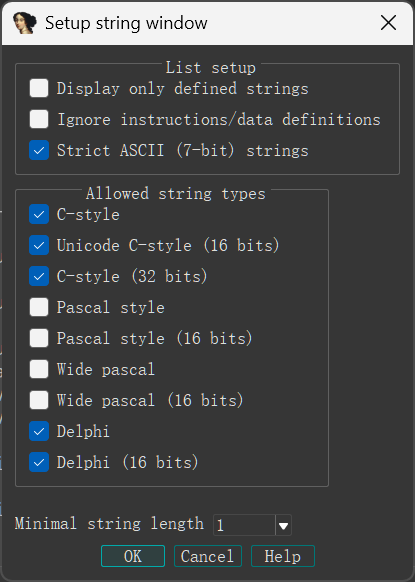
Strings 界面中右键 -> Setup
-
根据需要设置
-
-
-
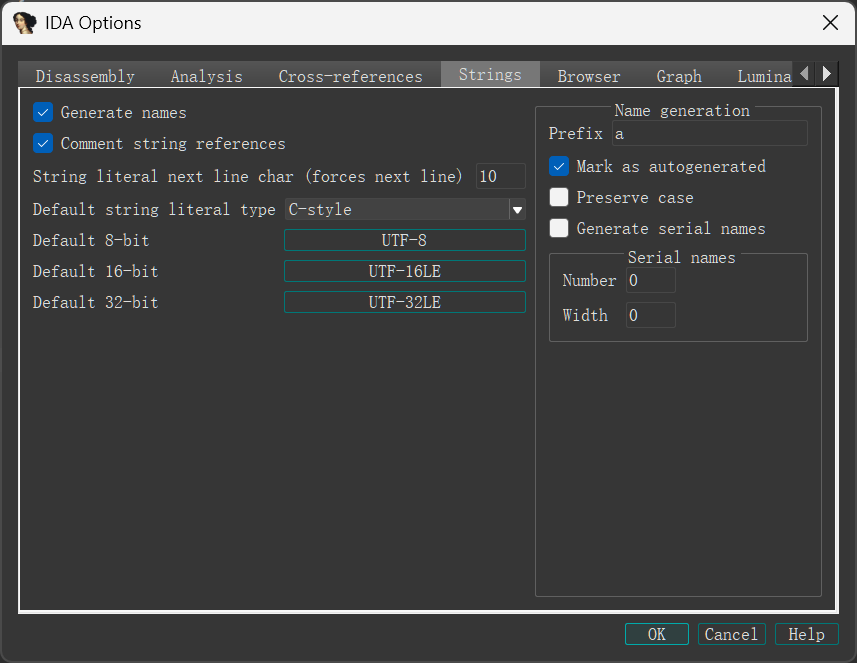
Options -> General -> String
-
-
编码问题
IDA 默认为英文环境,会自动忽略除 ASCII 码以外的字符,导致中文无法被解析。
解决办法:启动程序时带上
-dCULTURE=all参数;依据需要修改 Options -> General -> Strings -> Default 8-bit string 为UTF-8或者936(直接输入 CodePage 即可),再在 Strings 窗口右键 -> Rebuild。
3.2 sig
-
clone 到 sig/pc 目录下
-
下载磁链的 misc/signatures-bundles-9.1.metadata.zip,解压到 sig 目录下
使用时点击 plugins -> IDA Feeds 或 Shift + F5
3.2.1 自行创建静态库 sig
使用 tools/flair/pcf.exe 和 sigmake.exe
先获取 pat 文件:
pcf <static_lib_path> <output_pat_path>再把 pat 文件转换为 sig 文件:
sigmake <pat_path> <output_sig_path>可能有 collision,查看 exc 文件:
;--------- (delete these lines to allow sigmake to read this file)
; add '+' at the start of a line to select a module
; add '-' if you are not sure about the selection
; do nothing if you want to exclude all modules

_gzgetc 26 E38D 558BEC8B550885D2744E817A104F1C000075458B426485C0740583F8FB75398B
_gzgetc_ 26 E38D 558BEC8B550885D2744E817A104F1C000075458B426485C0740583F8FB75398B

_gzopen 00 0000 558BECFF750C6AFFFF7508E8........83C40C5DC3......................
_gzopen64 00 0000 558BECFF750C6AFFFF7508E8........83C40C5DC3......................
在想要包含的行前加上 +,然后把带分号的行删去,例如:
+_gzgetc 26 E38D 558BEC8B550885D2744E817A104F1C000075458B426485C0740583F8FB75398B
_gzgetc_ 26 E38D 558BEC8B550885D2744E817A104F1C000075458B426485C0740583F8FB75398B

+_gzopen 00 0000 558BECFF750C6AFFFF7508E8........83C40C5DC3......................
_gzopen64 00 0000 558BECFF750C6AFFFF7508E8........83C40C5DC3......................
最后重新运行 sigmake 命令即可。
3.3 pdb
在环境变量中添加条目:_NT_SYMBOL_PATH,值为放置下载的 pdb 文件的目录
加载某些 dll 时可能会自动提示下载,或者在调试界面手动下载 (Load Debug Symbols)
4 插件
- IDA Pro 插件目录:安装目录下的 plugins 文件夹
| 名称 | 功能 | 备注 |
|---|---|---|
| IDAscope | 加密算法识别、查看函数调用 api、yara | |
| HexRaysCodeXplorer | c++ 自动类型重建以及对象浏览 | |
| D810 | 去混淆,反 ollvm | 可能导致反汇编出错 |
| findcrypt-yara | 加密算法识别 | |
| findcrypt3 | 加密算法识别 | ida9.1 不可用 |
| signsrch-py | 加密算法识别 | |
| findhash | 加密算法识别 | 慢 |
| class informer | 反编译 C++ 时恢复类信息 | |
| KeyPatch | patch 指令 | |
| Patching | patch | |
| auto-enum | 恢复 api 的 enum 参数 | |
| Hrtng | 去混淆、lib 函数识别、解密 | |
| deREferencing | 显示栈和寄存器指向的内容 | 调试使用 |
| LazyIDA | 快速 dump 数据 | |
| StrConv | 字符串转换 | 自己写的,打个广告 (逃 |
| DelphiHelper | 加载 idr 的数据库、构造窗体控件树、VMT Parse | delphi 专用 |
4.1 IDAscope
- 把 idascope 文件夹、 idascope.py 和 requirements.txt 放到 plugins 目录下,运行
pip install -r requirements.txt - 打开 idascope 文件夹里的 config.py 文件,修改 “idascope\root\dir” 为 IDA 插件的根目录
4.2 HexRaysCodeXplorer
-
从这里下载适配 IDA Pro 9 的 HexRaysCodeXplorer64.dll
-
把 HexRaysCodeXplorer64.dll 放到 plugins 目录下
4.3 D810
- 把 d810 文件夹和 d810.py 放到 plugins 目录下
pip3 install z3-solver
4.4 findcrypt-yara
- 把 findcrypt3.rules 文件夹和 findcrypt3.py 放到 plugins 目录下
pip3 install yara-python
4.5 findcrypt3
下载 bin 目录下最新的 findcrypt3.dll 和 findcrypt364.dll ,放到 plugins 目录下
4.6 signsrch-py
- 把 signsrch.py 和 signsrch.xml 放到 plugins 目录下
- 修改 signsrch.py 的 87 行为
ignored = ["be", "le"][idaapi.inf_is_be()]
4.7 findhash
- 把 findhash.py 和 findhash.xml 放到 plugins 目录下
- 修改 findhash.py 的 199 行为
is_64bits = idaapi.inf_is_64bit()
4.8 class informer
- 把 ClassInformer64.dll 放到 plugins 目录下
4.9 KeyPatch
- 从这里下载适配 IDA Pro 9 的 keypatch.py
- 把 keypatch.py 放到 plugins 目录下
pip3 install keystone-enginepip3 install six(可能不需要)
4.10 Patching
- 下载 release 中的 patching\win32.zip ,解压到 plugins 目录
4.11 auto-enum
- 把 plugins 目录下的所有内容放到 plugins 目录下
4.12 Hrtng
- 下载 release 的 hrtng-2.4.30.7z ,转到 plugins\windows\9.1 ,把 hrtng.dll 放到 plugins 目录下;根目录下的 literal.txt 和 apilist.txt 放到 plugins 目录下
- 似乎不会在 Edit -> Plugins 中显示
4.13 deREferencing
- 把 deREferencing 文件夹和 deREferencing.py 放到 plugins 目录下
4.14 LazyIDA
- 把 LazyIDA.py 放到 plugins 目录下
4.15 StrConv
- 把 str_conv.py 放到 plugins 目录下
- 需要先调整默认编码
4.16 DelphiHelper
-
把 DelphiHelper.py 和 DelphiHelper 文件夹放到 plugins 目录下
-
按照提示,下载 idr 数据库并解压到 plugins/DelphiHelper/IDR_KB 下
-plugins
    -DelphiHelper
        -IDR_KB
            -IDR
                -kb2005.bin
                -......
            -IDR64
                -syskb2012.bin
                -......
    -DelphiHelper.py